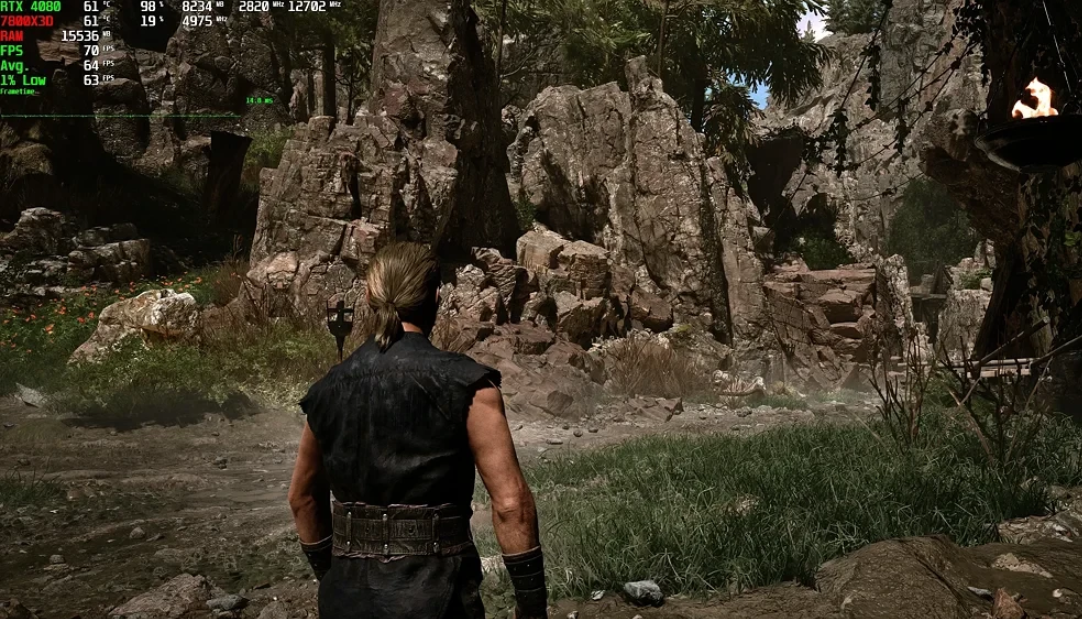
The Gothic 1 Remake is currently a classic example of a “raw” release on Unreal Engine 5. The sad reality is that the game suffers from microfreezes (aka “statters”), flickering shadows, sudden loading of objects, and the general feeling that optimization was done on the last day. Even on powerful PCs, users complain about a jerky picture, and on weak hardware, what happens on the screen sometimes resembles a slideshow.
We tested the Gothic 1 Remake on an i5-13600KF system with 32 GB of RAM and an RTX 4070 at 1440p resolution. In native resolution, we managed to squeeze 60-70 FPS, and with DLSS 4.5 (without frame generation), it was already 100-120 frames. AMD FSR 3.1.4 produced a similar frequency, but the picture is noticeably soapier, so the choice is obvious in favor of DLSS. By the way, it’s better to keep frame generation turned off — it adds a noticeable input lag.
Table of Contents
Optimal graphics settings for Gothic 1 Remake for weak PCs
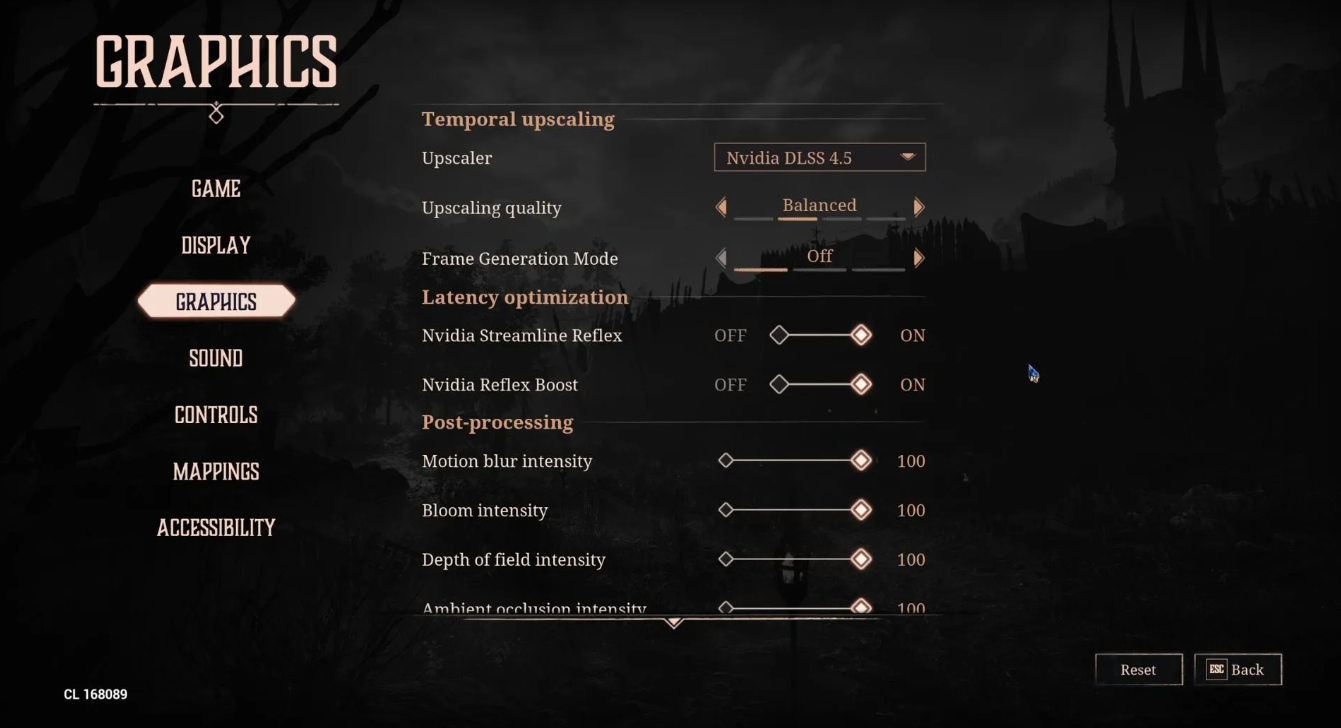
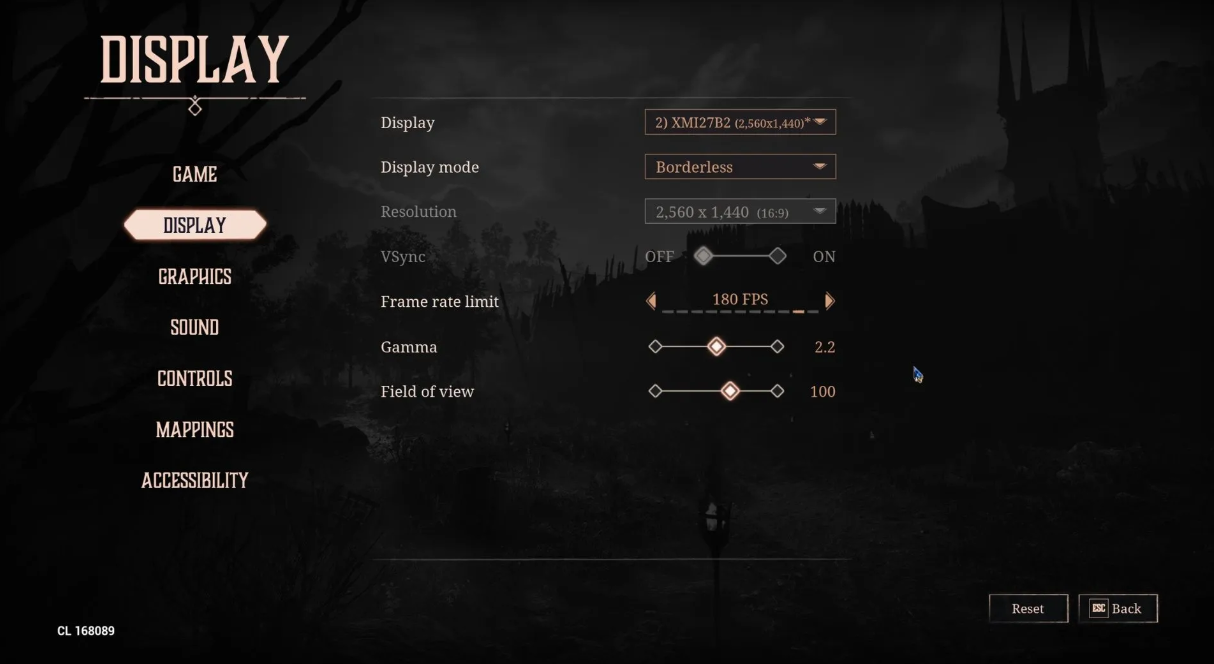
First, go to the time scaling section: select DLSS 4.5, the quality is “Balanced”. Frame generation is off. Be sure to turn on Nvidia Streamline Reflex and Reflex Boost — this reduces latency. In post-processing, you can safely leave everything at 100, except for sharpness (preferably 50). Next is the rendering quality. We set the preset to “Custom”. The drawing range is medium, anti—aliasing is high, shadows and global illumination are medium. Reflections are average, post-processing is average. Textures are a separate “Gothic” item (yes, the developers called it that — it sounds funny). The effects are high, but we boldly turn the foliage and wind to “Low” — they consume resources disproportionately. The landscape is high. On the display: frameless mode, vertical synchronization is off, limit the frame rate to 60, 144 or 180, depending on the monitor. Gamma 2.2, field of view 90-100.
How to remove lags and statters in Gothic 1 Remake on UE5?
Alas, you cannot completely get rid of microfrictions. This is a problem of low—level optimization of the game itself – a typical story for many UE5 projects. The solution is only for patches from developers. But you can still do something: the settings described above reduce the number of rhythm “disruptions” and make them less noticeable. Players on Reddit also advise disabling the hardware GPU scheduler in Windows (but this is a double-edged sword). In general, the hope is for mods and urgent updates. In the meantime, be patient and play with DLSS.
Setting the frame limit to stabilize the time frame
By default, the game tries to squeeze out as much FPS as it can. In practice, this leads to wild jumps: 140 frames, then a sharp drop to 50 — and here it is, the most disgusting microfriction. The solution is not difficult: we set a limit on the maximum refresh rate of your monitor. If the system is weaker, feel free to set 60 FPS. Yes, it’s not ideal, but at least the picture will stop twitching at the most inopportune moments.
Choosing the best DLSS upscaler against FSR and XeSS
In native resolution, playability is a lottery. On top-end configs, it’s still back and forth, and on the average hardware, the Gothic 1 Remake turns into a slideshow. The developers have added a whole range of scalers: DLSS, AMD FSR, Intel XeSS and Unreal TSR. Choose the one that works best for your graphics card. The effect is the same — higher FPS and fewer “statters”. We recommend DLSS 4.5 for NVIDIA owners, and experiment with the rest.
Graphics Card Tests in Gothic 1 Remake and System Requirements
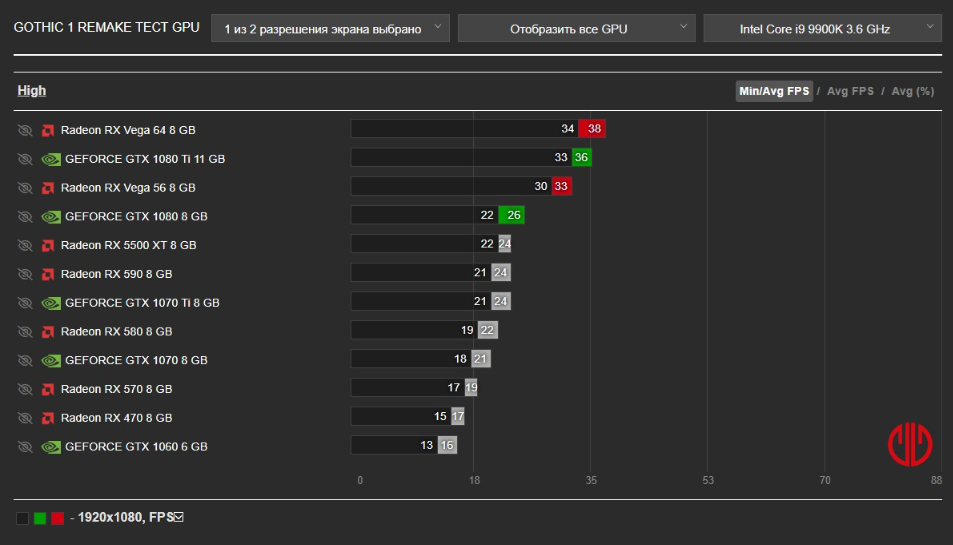
Alkimia Interactive Studio released Gothic 1 Remake, and the requirements of the game turned out to be truly voracious. The developers have set an atypically high bar for video memory — the minimum configuration requires as much as 12 GB of VRAM. This arrangement automatically leaves out iconic people’s maps like the RTX 3070 or RX 6650 XT, which have only 8 GB on board. And this is not a typo by marketers. The Unreal Engine 5 engine with its Nanite and Lumen technologies eats up memory on an industrial scale, plugging any title of the previous generation into its belt.
The official specifications divide PC configurations into two camps:
System Requirements
However, it’s too early to rejoice. Based on the first tests and benchmarks, the official table looks too optimistic, and the harsh reality hits gamers’ pockets much harder.
RTX 3060 Performance 12 GB in Gothic 1 Remake
The popular RTX 3060 in honest native rendering produces a measly 25 frames at high 1080p settings. Playing in such a slideshow is a dubious pleasure. Only the upscaler saves: if you subtract DLSS in Quality mode on a High preset, the video card pulls out a completely sane 55-60 FPS. The native is useful here except for tests. Memory consumption in FullHD stays around 7 GB, but once you switch to 1440p, the counter immediately hits the 8 GB ceiling. So the 12 GB of memory on board the RTX 3060 saves the day, but there’s only enough storage for the basic resolution.
How much VRAM is needed for RTX 4060 in Gothic 1 Remake?
The pure power of the RTX 4060 chip is quite enough for native FullHD, but a modest 8 GB buffer turns the card into a time bomb. In Gothic 1 Remake, the difference between the 8 GB and 16 GB versions becomes critical. Due to the specific algorithms of working with textures, the younger model suffers the most — the framerate drops with any attempt to set the quality higher. As a result, owners of the RTX 4060 8 GB will have to compromise: set the settings to Low/Medium, enable DLSS Balanced, and cut textures to the “Gothic” preset. It’s better not to even look at 1440p.
Testing the AMD RX 7600 graphics card in 1080p resolution
The budget hit from the “reds” in the face of the RX 7600 shows similar results, producing about 30+ frames in native 1080p at medium and high settings. The problem is still the same — a catastrophic shortage of VRAM. The situation is aggravated by the lack of support for FSR 4, which has remained exclusive to the new RX 9000-series. We have to get out with the help of the old FSR 3.1.4. In Balanced mode, although it boosts frames, it gives a much more soapy picture than the NVIDIA competitor. The obvious conclusion is that if you choose between the base model and the RX 7600 XT with its 16 GB, then the memory surcharge will pay for itself in the first canyon of the Old Camp.
Graphics cards for stable 60 FPS in native resolution
Stable performance without crutches in 1080p is provided by GPU level RX 6800 XT or RTX 4060 Ti. Do you dream of pure 1440p? Prepare money for the RX 7900 XT or the brand new RTX 5070. All other PC owners will have to be friends with scaling technologies — without them, the game turns into an unplayable mess. By the way, there is an important caveat that the developers have modestly kept silent about. The claimed 32 GB of RAM is a harsh necessity, not a luxury. The combination of Lumen and Nanite puts a lot of strain on the system when streaming the open world. Users with 16 GB of RAM regularly experience unpleasant spikes in frame time and stuttering sound in overcrowded locations. You can forget about the HDD right away: without a fast SSD, the game simply does not have time to load assets, guaranteeing tons of microfreezes even on powerful chips.
Review of the Ultimate Engine Tweaks mod for Gothic 1 Remake
PC players were a little more lucky. A mod called Ultimate Engine Tweaks for Gothic 1 Remake gives an increase of 10-18 frames. But that’s not even the main thing. The mod stabilizes the minimum FPS, the same value that causes the main friezes on Unreal Engine 5. The installation is simple: it was taken from the Nexus Mods, unpacked into the folder with the game.
The studio, of course, had to file it down itself — but that’s what it is.