Grand Theft Auto 6 pre-order holders receive a nice bonus—a free month of GTA+ premium. This isn’t just a freebie: the subscription will automatically renew after the trial period unless auto-pay is disabled. If you don’t want to be charged for the next month, you should manage your settings immediately after activation. The bonus is valid only in GTA Online and is tied to the platform you pre-ordered on—PlayStation or Xbox, but not PC.
You can redeem your gift until March 31, 2027—so you have time, but it’s best to do so now.
Table of Contents
GTA+ Subscription Benefits in GTA Online
GTA+ is monthly premium access to exclusive perks in GTA Online. The subscription awards $500,000 in-game cash each month, plus 15% bonus GTA$ when you purchase Shark Karts. Add to this regular discounts on vehicles and weapons, increased mission payouts, and access to the Vinewood Auto Club, where you can store up to 100 cars and claim free ones. The subscription also unlocks a library of Rockstar classics: GTA V, Red Dead Redemption, Bully, the Definitive Edition trilogy, and several older GTA games. The set of benefits changes every month, so you won’t get bored.
Considering that you’re getting a month free, activating the offer is definitely worth it—especially if you’re an active GTA Online player. But remember: the subscription is only tied to the console you pre-ordered on. Your GTA Online progress does not transfer between platforms, so choose carefully.

GTA+ Free Month Activation Rules
The bonus subscription is not a generous, no-strings-attached gift, but a strictly regulated offer from Rockstar Games. Any attempt to cheat or redeem the bonus will not work: each Rockstar Games Social Club profile can only claim the gift once. You can’t use the trial period a second time on the same account, even if you pre-order another game.
Furthermore, the bonus is locked to the platform where the purchase was made—whether PS5 or Xbox Series X|S. Transferring your subscription to another console is technically impossible. This is due to the GTA Online architecture, which completely eliminates cross-progression. Your virtual millions, leveled-up character, and premium Vinewood Auto Club garage are tightly tied to a specific ecosystem. If you pre-ordered on PS5, all GTA+ benefits will remain exclusive to PS5—there’s a wall separating PlayStation and Xbox.
The final deadline for activating the freebie is March 31, 2027. This deadline is directly tied to the release of the long-awaited GTA 6, so if you miss this deadline, the bonus will be forfeited. Don’t forget about regional nuances. The availability of the promotion depends solely on the region of your PlayStation Network profile or Microsoft account, not your physical location. If the coveted “Free” label isn’t visible on the GTA+ button in the store interface, it means the offer has either not yet launched in your region or has been permanently blocked. PC players (Steam, Epic Games Store, Rockstar Launcher) miss out on this promotion entirely—this bonus is not available on computers.
Requirements for receiving the GTA+ bonus
-
Activation limit: strictly one per account;
-
Platform: current-generation consoles only (PS5 or Xbox); the promotion is not available on PC;
-
Bonus migration is not possible due to the lack of cross-progression between different consoles;
-
Deadline: you must claim your gift by March 31, 2027;
-
Regional restrictions: depend on the country your PSN or Microsoft account is registered in.
GTA+ Subscription Checklist
First, make sure you’re on the correct console—you must pre-order the game and activate the bonus on the same device and under the same account. Be sure to check the price tag in the store: it should say “Free,” otherwise, the system will automatically charge the standard subscription price to the linked card. And most importantly, don’t wait until the last minute. It’s best to activate your bonus month early, rather than waiting until the critical March 31, 2027, deadline.
Activating Your Free Month on PS5 and Xbox

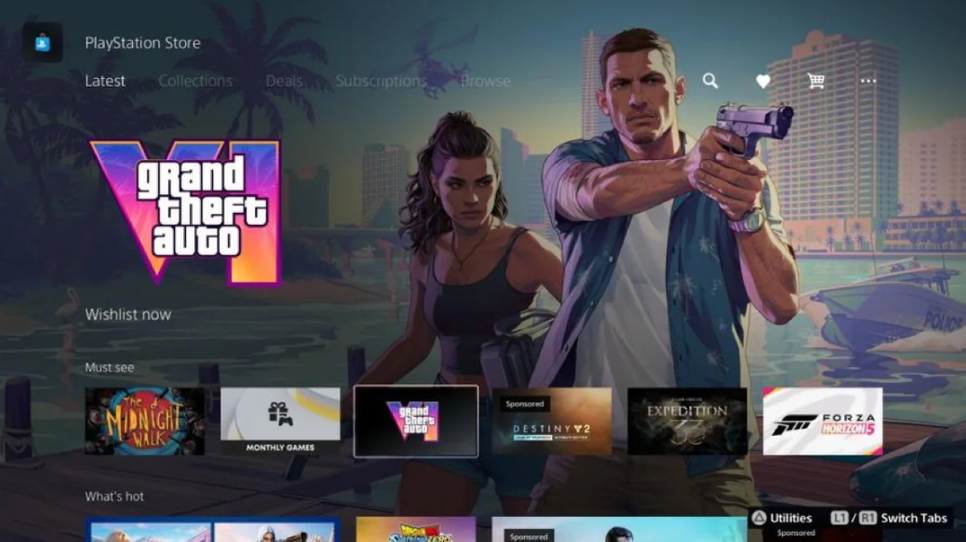
After pre-ordering GTA 6, go to the store (PS Store or Microsoft Store) on the same console where you purchased the game. Find the GTA+ page—instead of the price, it’ll say “Free” and show activation instructions. Click it, and the bonus will activate. It’s easy—just a couple of clicks.
How to disable auto-renewal for a GTA+ subscription
Let’s go over the most important things. After activation, your subscription will automatically renew. To avoid being charged after 30 days, do the following:
On PlayStation:
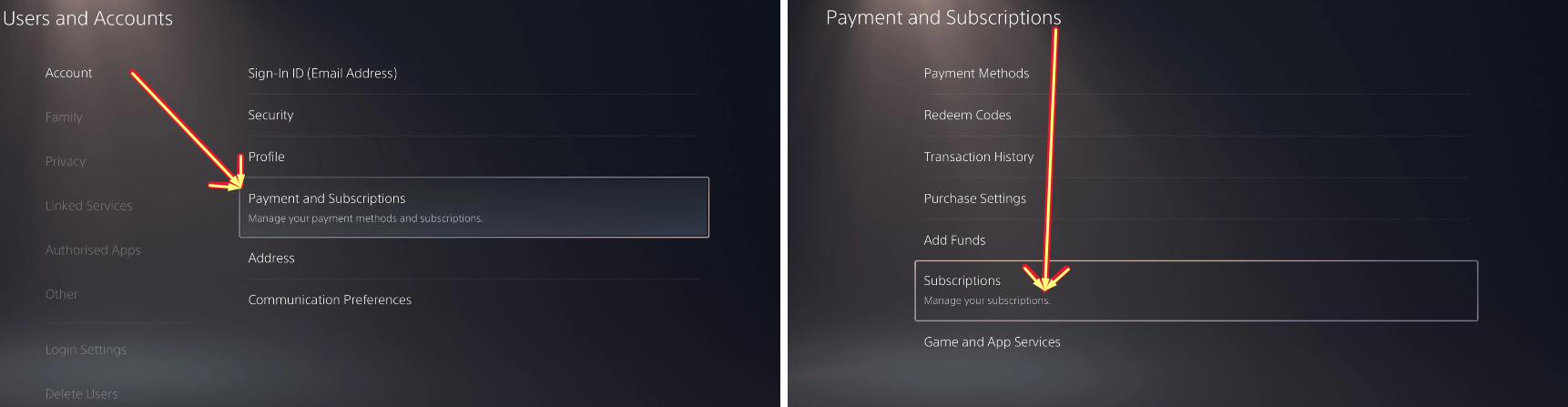
Go to “Settings” → “Users & Accounts” → in the “Account” tab, select “Payments & Subscriptions” → “Subscriptions.” Find GTA+ and turn off auto-renewal at the bottom of the screen. That’s it.
On Xbox (via console):
Press the Xbox button, go to “Profile & System” → “Settings” → “Account” → “Subscriptions.” Select GTA+ and click “Cancel Subscription” or “Turn Off Recurring Payments.”
From a browser (for Xbox):
Go to the “Subscriptions” page in your Microsoft account, sign in, click “Manage” next to GTA+, and select “Cancel Subscription.” If the button is grayed out, it means you’ve already canceled, and it will say “Enable Recurring Billing” instead; you don’t need to click it.
Do this immediately after activation so you don’t forget. Incidentally, you can cancel at any time, but it’s best to play it safe.
In short: a free month of GTA+ for pre-ordering GTA 6 is a great bonus, but only if you remember to set auto-renewal. Activate by March 31, 2027, enjoy premium features, and don’t forget to turn off recurring billing to avoid overpayments. Happy gaming!