Assassin’s Creed Black Flag Resynced on PS5 Pro has already sparked some worrying reports—once again due to HDR issues. Calibration experts at GamingTech conducted a meticulous analysis of the PS5 Pro version and delivered their verdict: the game ignores the console’s system settings, and black levels are shifted toward gray. However, all is not lost; below, we provide specific figures to correct the image without any unnecessary hassle.
Why does Ubisoft consistently stumble when it comes to HDR? This is a fundamental issue, not merely a case of oversight. The Anvil engine powering the remake uses a proprietary implementation of ACES color grading, yet the static HDR metadata is configured in a way that disrupts the TV’s tone mapping. This is particularly noticeable on OLED panels, where blacks should be absolute but instead appear milky gray in the game. Architecturally, the game does not pull data from the PS5 system menu; users must manually adjust the peak brightness slider within the game’s own settings.
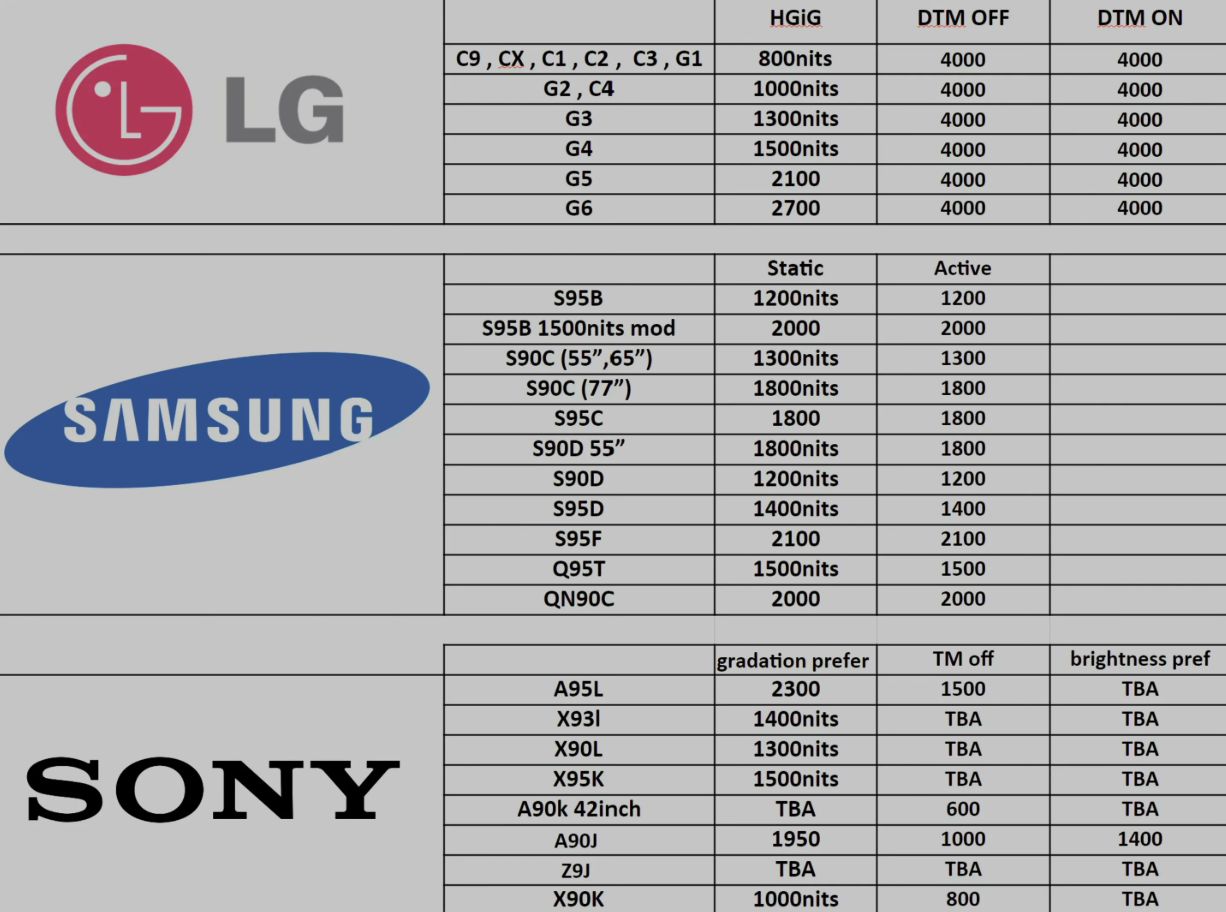
This is where GamingTech’s recommendations come in handy. According to their chart, the optimal peak brightness setting is 800–900 nits for HGiG mode (accurate tracking) and 1000–1100 nits when Dynamic Tone Mapping is active. Input these values into the Black Flag Resynced menu, and contrast levels will return to normal. This is especially critical on OLED displays, where the distinction between gray and true black becomes immediately apparent.
The developers have remained silent so far, but past experience with Ubisoft titles suggests that patches rarely fix fundamental architectural flaws. Consequently, PS5 Pro owners are left to handle the calibration manually. It is quite logical to assume that the issue will carry over to Xbox and PC—there are no official statements, but the engine is the same across all target platforms. So, if you were hoping for perfect HDR “out of the box,” you will unfortunately have to rely on the chart and your own eyes.