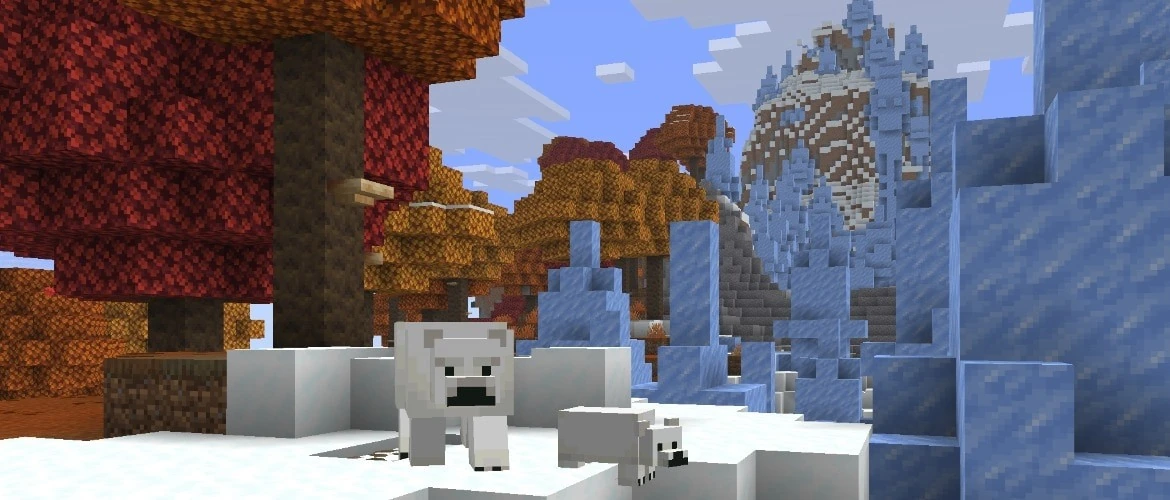
Minecraft Java 26.3 Snapshot 10 combines visible menu changes with deeper technical work. Players see a new Dappled Forest panorama and a Realms introduction screen, while map makers receive new command and data options. Mojang also reports better performance when the game searches for structures.
Table of Contents
The menu now points toward the next world style
The main menu panorama shows the Dappled Forest beside an Abandoned Camp. It is a presentation change, but it also gives players a clear visual reference for content in the 26.3 development cycle. The image is useful because it displays the biome as a complete place rather than reducing the update to a list of blocks. Players can see the colour, terrain and relationship between the forest and its generated structure before starting a test world.
Mojang also changed the Adventure Mode icon in the game mode switcher to a buried treasure map. This is a small interface correction, yet it makes the mode easier to identify. Snapshot work often includes these modest changes alongside larger systems. They should be judged as interface polish, not described as new survival mechanics.
Realms gets a clearer first step
A new Realms introduction screen explains the service’s main features. It can be opened from the Add Realm button and can appear automatically when a trial is available. The screen does not change the rules of a Realm. Its role is to make the decision easier for a player who has not used the service and may not understand how a private shared world differs from a local save.
Good onboarding matters because Realms includes several choices before a world is active. A player needs to know that invited friends can enter the hosted world without the owner keeping a home machine online. Presenting that idea before payment or trial activation reduces confusion. Experienced owners can continue to manage existing worlds without treating the new screen as a required tutorial.

| Part of the update | Main change |
|---|---|
| Main menu | Dappled Forest and Abandoned Camp panorama |
| Realms | New introduction screen |
| Performance | Faster structure location work |
| Accessibility | Subtitles point to the latest sound |
Structure searches should place less pressure on performance
The snapshot improves performance when the game tries to locate structures. That work affects commands and systems that search large areas for a valid position. A slow search can pause a server or make a single-player world feel unresponsive even when normal movement is smooth. Reducing the cost of that calculation helps administrators and map makers who use location tools repeatedly.
The change does not mean every chunk will load faster in every situation. Structure location is one specific task inside world generation. Players should compare the same command, seed and search conditions when testing it. A fair comparison avoids crediting the snapshot for an unrelated hardware change or blaming it for a delay caused by a different data pack.
Explorer maps use more consistent names
Several explorer maps were renamed so their labels follow the same pattern. Ocean Monument, Swamp Hut, Woodland Mansion and Jungle Pyramid maps now identify the target more directly. The Trial Chambers map becomes the Buried Trial Chambers Map. Consistent names help players scan a cartographer trade and understand the destination without learning several different naming rules.
The update also adjusts related tags and resource names. These technical changes matter to resource-pack and data-pack authors because a renamed identifier can break an old reference. Creators should read the migration details before loading an important project. A copy of the world and pack provides a safer place to find outdated names.
Accessibility follows the newest sound
Subtitles now point toward the most recent sound in range. Before this change, a repeated caption could continue to indicate an older position even after a newer sound played elsewhere. The correction makes the direction more useful for players who depend on captions to locate movement, creatures or environmental activity. It also keeps the visual cue aligned with what the audio system has just produced.
Mojang fixed several other caption and interface problems, including sounds that produced no caption and strings that used inconsistent wording. These repairs do not add spectacle, but they improve trust. An accessibility cue must be timely and accurate. A label that appears late or points the wrong way can be worse than no guidance because it sends the player toward the wrong place.
Test worlds are the safest place for this preview version
Snapshot 10 changes command syntax, data components, world-generation functions and resource-pack versions. That makes it valuable for creators who need time to prepare, but it also makes it unsuitable for an only copy of a long-running world. Mojang warns that test versions can damage saves. Backups and separate installations are part of responsible testing, not an optional step after something breaks.
The best first session has a narrow goal. A player can inspect the panorama and Realms screen, test one structure search and load a copy of a pack that uses changed identifiers. Recording each result separately makes a bug report easier to understand. It also prevents a long list of simultaneous changes from hiding which part of the snapshot caused the problem.