Title Update 1.0.7 is already available for Assassin’s Creed Black Flag Resynced. It adds options to hide Edward’s pistols and visual perk effects, introduces a dog that can later appear at the hideout, and corrects problems in exploration, quests, accessibility, audio and stability. Download sizes differ greatly by platform, so the number shown for one system should not be applied to another.
Table of Contents
Visual options reduce clutter without changing equipment
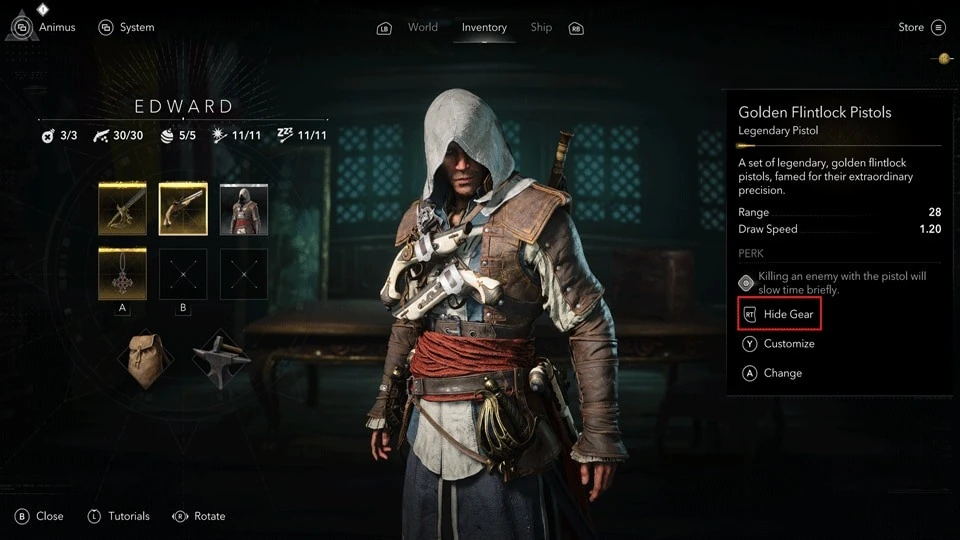
Players can now hide the pistols shown on Edward’s model, extending an option that already covered the blowpipe. Perk visual effects can also be disabled. These settings change presentation rather than the items owned by the character. A pistol remains available when its visible model is hidden, and a trinket keeps its perk when the glow is turned off. That separation is useful for screenshots and for players who prefer a cleaner costume. Anyone testing the option should check both ordinary movement and a combat transition before assuming that the equipment itself was removed.
Open-world fixes prevent progress from breaking during long journeys
The patch addresses a fall through the world after fast travel to Principe, ships that could spawn outside the map and regions that failed to reveal after a fort was completed and synchronized. These problems interrupted exploration even when the player had met the stated condition. Existing saves should be loaded near a known affected location, then tested once under the new version. Repeating the exact route is more informative than roaming for an unrelated error. If the map still fails, the report should include the current version and the sequence used to reach the location.
| Platform | Listed download size |
|---|---|
| Xbox Series X|S | 15.26 GB |
| PlayStation 5 | 1.53 GB |
| PC through Ubisoft Connect | 3.86 GB |
| PC through Steam | 2 GB |
Eagle Vision should give more consistent information
Enemies could become impossible to mark in Eagle Vision when health bars were disabled in the HUD. A ship lift could also glow with excessive brightness after the same vision mode was used. Both errors mixed an accessibility or interface choice with information needed during play. Update 1.0.7 separates them again. Players who hide health bars should still be able to use marking, while the ship object should return to a readable brightness. This is a practical improvement because a minimal HUD should not quietly remove a different navigation tool.
Several missions no longer fail when a character stands in the wrong place
Quest fixes cover guards who would not interact with Upton unless Edward stood nearby, James Kidd becoming stuck when the player moved ahead, and Ah Tabai freezing after Edward eliminated a target first. These situations punished exploration or fast action with a blocked sequence. The patch also closes an objective exploit in Right-Hand Man and prevents waterspouts from repeatedly destroying Charles Vane and his ship. Each correction has a specific trigger, so the notes do not promise that every mission bug in the game has disappeared.
Save and fleet screens are now more stable
Ubisoft lists crashes connected to the Store or News panel, Kenway’s Fleet ship selection and a rare PlayStation 5 out-of-bounds case. A missing Stede Bonnet after loading an older save with British cutlasses purchased was also corrected. These fixes matter because they occur around menus or stored progress, where a crash can feel detached from the action that caused it. Players should keep a backup before opening an old campaign, allow cloud synchronization to finish, and then verify the relevant character or fleet screen before continuing a long session.
Accessibility fixes affect several settings
The update corrects color-blindness problems in both red-green and blue-yellow preset settings. It also restores missing menu narration and gameplay captions. Those are separate functions and should be checked separately: a readable color state does not prove narration is working, and a caption test does not cover every menu. A useful first check opens one busy interface, listens through its choices, then enters a scene with dialogue or sound cues. The patch aims to restore the information, while personal size and volume preferences may still require adjustment.