
An event has happened! The long-awaited launch of Highguard turned out to be a real test of strength for gamers. A free shooter created by natives of Respawn, faced a wild technical collapse right on the day of release. Players, apparently, instead of lively shootouts, are forced to spend hours hypnotizing endless queues at the entrance. Unsurprisingly, the project’s Steam page quickly turned red — the user rating is now hovering at the level of “Mostly negative” reviews. Below we will tell you how to remove queue restrictions using proven methods.
Table of Contents
How to log in to HighGuard without queuing: proven ways
It seems that the triumphant launch of HighGuard turned into an endless contemplation of the loading screen for many gamers, because the servers, to be honest, simply “lay down” under the pressure of the crowd. By the way, the problem with queues now worries every second person, but there are several working chips that will help break into the rink faster than the rest. The point, in fact, is not to hack the system, but to maneuver competently between regions and optimize your connection.

Why is HighGuard making us wait?
Actually, there are several reasons for this, and the main one is unexpected success. The peak on Steam almost immediately broke through the 100,000 simultaneous users mark, which is a powerful result for a new free shooter, however. Apparently, Wildlight Entertainment’s network code has not yet digested such chaos, which is why authorization “freezes” and progress in the queue is simply not displayed. In addition, during the evening prime time, the communication nodes are overloaded so much that the Waiting in login queue screen becomes literally eternal.
Configuring the system and checking the status of HighGuard servers
Before dancing with a tambourine, you should make sure that the problem is not on your side.
-
Check the status. Take a look at the official summaries or the Steam community – if everyone’s HighGuard servers have crashed, then no VPN will save you, you’ll just have to wait for patches.
-
Restart is our everything. Restart the launcher and router, because this is, apparently, the only way to reset the “dead” sessions that keep you in a phantom queue.
-
Hardware and software. Make sure that Secure Boot and TPM 2.0 are active, otherwise the game may throw you out right at the login stage.
Change the region for quick access to the HighGuard servers
This is probably the most effective way to get around traffic jams if you’re stuck in the most popular region.
The logic is simple: while Europe and the United States are suffocating from the influx of streamers, less hyped locations are empty.
-
Study the list. Go to the HighGuard settings and see the delay to different points. If there is no choice inside the game, use third—party software to monitor nodes.
-
Look for balance. Choose a server with sane ping, but not the top one in popularity — for example, neighboring regions are often launched almost instantly.
-
Consolidate the result. After selecting, be sure to restart the session so that matchmaking recalculates your position already in the new “cloud”.
Speeding up entry into HighGuard through traffic optimizers
A separate topic is special optimizers like GearUp. By the way, they are not considered cheats, as they work only with traffic routes, without touching the files of HighGuard itself. Such services automatically find the shortest path to the server, bypassing the providers’ busy highways. As a result, there are fewer breaks, stable ping and, most importantly, faster flight through the queue. For console players (PS5, Xbox), by the way, there are hardware solutions like the HYPEREV router that do the same thing at the level of the entire home network.
Useless and dangerous ways to bypass the HighGuard queue
You should not rush into all the hard stuff, because some of the “tips” from the network will only make it worse.
-
Regular VPNs. They simply encrypt the data, often adding extra “hooks” on the route, which only increases the lags in HighGuard.
-
Random DNS. Manually editing network parameters without understanding the process, in principle, only leads to instability of the connection.
-
Heavy traffic. Streams and downloads in parallel with the game clog up the channel, provoking discounts — and you’ll find yourself at the end of the queue again, it’s a shame, really.
Tips for stable connection and search for empty servers
Finally— a couple of everyday tricks. Try to catch “quiet windows” early in the morning or on weekdays, when the initial excitement subsides. Also, apparently, it is worth avoiding logging into the game during major broadcasts on Twitch — when top streamers fly into HighGuard, the servers begin to crack at the seams. Keep an eye on the patchnotes: developers are constantly expanding their capacities, so the situation will definitely improve over time.
Online statistics and Wildlight’s plans to fix the game
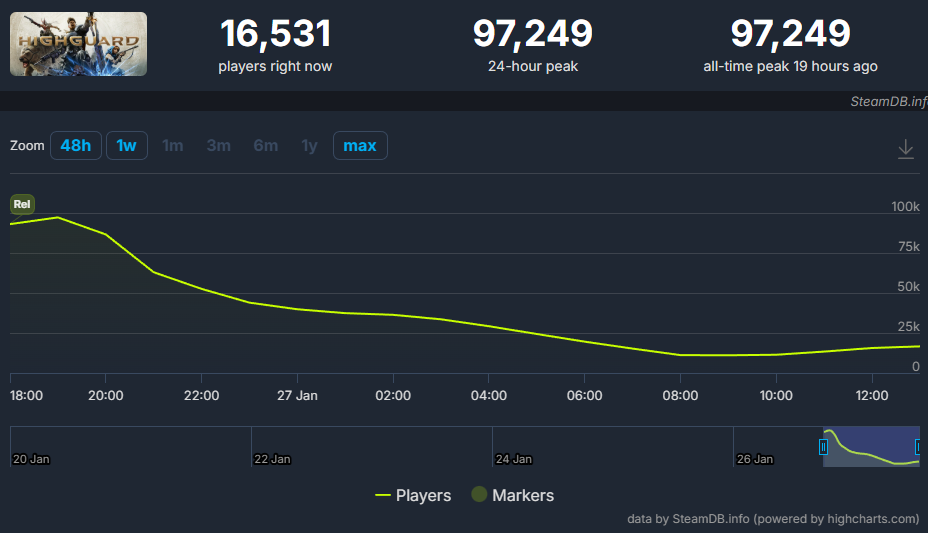
Interestingly, the peak attendance on Steam in the first hour almost reached 100,000 people — a strong start according to statistics. The team from Wildlight Entertainment, apparently, simply did not calculate the load, although there are veterans in the studio who had a hand in Apex Legends and Titanfall. Those lucky ones, by the way, who still broke through the network gags, praise the gameplay and the overall polishing of the mechanics. In general, if the developers do not promptly fix the server hardware, the cool announcement from The Game Awards 2025 risks becoming a resounding failure due to a banal lack of capacity. It’s a shame, actually, because the potential of the game is huge.