
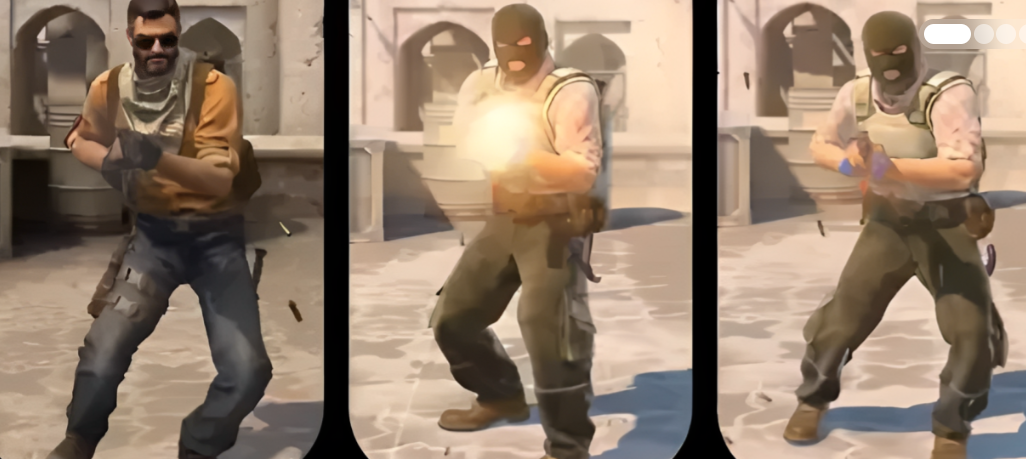
Valve rolled out an update for CS2—on the night of April 21st, the game finally received the long-awaited Animgraph 2 animation system. Beta testing lasted almost three weeks, and now the release is here: 3.1 GB, reworked animation logic, optimized CPU and network load. It looks like the developers have taken smoothness and responsiveness seriously.
Incidentally, the changes affected more than just the visuals—weapon behavior, transitions between attacks, even grenades in hand. Everything has become slightly different. We’ll break down exactly what changed below.
CS2 Patch from April 21, 2026: Full Analysis
Animgraph 2: Key Innovations of the CS2 Patch
Valve has rewritten the animation system. Now:
- The character model moves with minor adjustments—noticeable to the naked eye.
- Weapon deployment logic has been changed. Not radically, but experienced players will notice. • Fixed bugs with transitions between knife strikes—previously, the animation could “stick.”
- The bug that prevented Elites (presumably referring to enemies in third-person mode?) from firing is also a thing of the past. Yes, that was a bug.
CS2 Fixes: Ladder and Grenade Bugs
This list is short, but useful:
- Silent climbing of ladders while running (it was enough to periodically press the movement keys)—fixed. Finally.
- Appropriate surface smoothing at the transitions from sloped to flat areas—adjusted. Sounds like a fix for maps with uneven terrain.
- Grenades in hand sometimes had an incorrect scale after falling and picking them up—it looked ugly. Now it’s in order.
- Critical bug with a match break when switching sides (from CT to T)—fixed. Otherwise, the match could simply crash.
Therefore, Valve has addressed several long-standing technical debts. Animgraph 2 isn’t about visual wow-factor, but rather about animation stability and responsiveness at high tick rates. And yes, you’ll still have to download 3.1 GB.
Animgraph 2 in CS2: Beta Test Complete
Valve has migrated all the work from the beta version to the regular build. And this isn’t just an experiment anymore—the new Animgraph 2 animation system is now live on official servers for everyone. No exceptions.
The developers also tweaked a couple of things: the viewmodel was slightly adjusted, and the weapon draw logic was made more accurate. They also fixed some bugs with the transitions between knife attacks. A small thing, but a nice touch.
Weapon and Bot Changes in the CS2 Update
On a less obvious but amusing note: Valve has finally nailed the weird bug with ladders. Remember how you could silently fly up by rhythmically pressing A and D? No longer possible. The bot_strafe command has been added. Bots can now strafe at a set distance. And if you enter bot_strafe 0.5, they start doing a weird dance. It looks hilarious
By the way, gunplay has also been improved. The Glock-18 and Famas have received a new burst mode—a three-bullet burst now fires noticeably faster, and the spread has been reduced. In practice, this means the weapons feel almost laser-like in burst mode. Perhaps even over-powered. Let’s see what the pros have to say.
How to test Animgraph 2 in CS2: a personal test
Since we’re talking about “pros,” it’s time to see for ourselves what Valve has tweaked. I’ve been stuck with the update for about an hour and a half: I played the local server, then joined the retake server. Below, I’ll tell you everything about “it feels smoother,” just the specifics of the numbers and commands. Animgraph 2 fixes three things that are really noticeable both visually and through the CS2 console. The first is the correct pose of the model when turning sharply 180°. The second is that famous synchronization of the legs with the movement speed (hello, “sliding boots,” you’ve been tormenting the community since release). The third is the transition from crouching to standing when changing the gun. You don’t need to download demos from Faceit. Source 2’s built-in tools are more than enough.
CS2 Console Commands for Debugging Animations
Let’s start with the basics: press the tilde (~), open the console, and enable developer mode. Without sv_cheats 1, most of the commands below will simply fail—the engine rejects them in public play. Therefore, we test them on a local bot match (map de_mirage → bot_add) or use the classic aim_botz workshop map.
Basic debugging kit for CS2:
Now, practice. Go to aim_botz, enable thirdperson, and set cl_showanimstate to 1. A block with animation layers appears in the lower right corner of the screen—the m_flLastEventCycle, m_flPlaybackRate, and m_flMoveWeight parameters are highlighted there. We try the adad shake (that same strafe-shuffle)—m_flMoveWeight should jump sharply between 0 and 1, without a smooth fade. Before the patch, the parameter would get stuck at 0.3–0.5, resulting in the character’s legs moving in one direction for a couple of frames, while the body was already flying in the other. Now there’s no lag. I tested it on a 128-tick local network.
The second case is leg animation during diagonal running. Hold W+D and look at the model in third-person. The feet should be positioned diagonally, and the pelvis should rotate 30-40° relative to the viewing angle. If the feet are sliding along the floor texture (foot sliding), it means the animation graph hasn’t picked up the map profile. This can be fixed with the mat_reloadallmaterials command, or, in extreme cases, with a simple reconnect.
The third test is the most challenging—swapping weapons while running. We take the AWP, accelerate forward, and press Q while moving to switch to the pistol. Before Animgraph 2, the viewmodel would essentially teleport to the final pose in 2-3 frames—roughly, choppily, without an animated transition. Now the transition is stretched out over 7-8 frames, but—and this is key—the actual frame of readiness to fire occurs earlier. Valve simply moved the weapon activation moment closer to the beginning of the animation. This is most easily detected by using demo_timescale 0.1 when viewing the recording: the frame-by-frame difference is visible to the naked eye. A few words for anyone planning to file a bug report with Valve. Install developer 2 and open the console.log file in the game/csgo/ folder—warnings about animation tag mismatches will be there. This is essentially the only working way to prove to support that the issue is engine-related, not your NVIDIA drivers or a broken Discord overlay. Screenshots aren’t enough—logs are crucial.
Comments